 Girl's Behavior
  Guy's Behavior
  Flirting
  Dating
  Relationships
  Fashion & Beauty
  Health & Fitness
  Marriage & Weddings
  Shopping & Gifts
  Technology & Internet
  Break Up & Divorce
  Education & Career
  Entertainment & Arts
  Family & Friends
  Food & Beverage
  Hobbies & Leisure
  Other
Other  Religion & Spirituality
  Society & Politics
  Sports
  Travel
  Trending & News

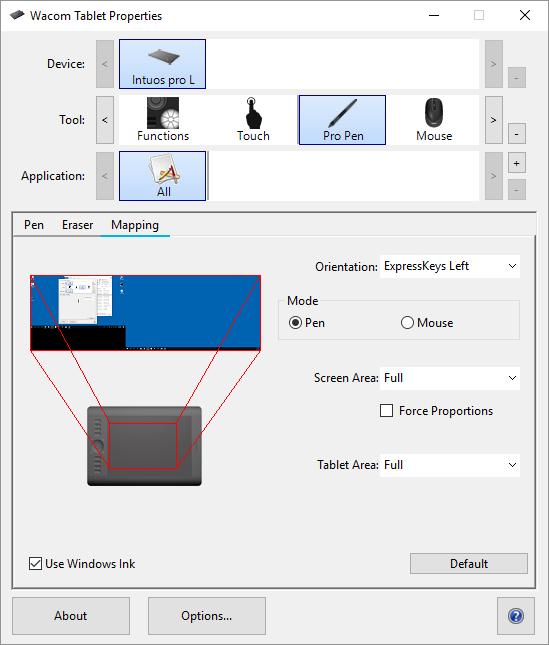
I bought a WACOM graphic tablet so I could start drawing on my computer. My software of choice is Photoshop and it works fine, except for one issue:
My pen isn't restricted to just the Photoshop canvas: when I use the tablet and pen to draw, my drawings sometimes go off the canvas and instead interacts with other things on my desktop; sometimes I even close Photoshop by accident because i'll go to draw something with the graphic tablet pen but instead hit the red X button on the top right of the Photoshop window due to the
tablet's touch radius encompassing the entire screen.
Hope i'm conveying my problem clearly enough (not sure how to best word it) but what i'm trying to say is, I want to "lock" my graphic tablet pen to just the Photoshop canvas; if I tap/draw something on the graphic tablet with my pen, I don't want it to interact with anything outside of the canvas.
How can I do that? Is there an option or setting I need to check or something?
My pen isn't restricted to just the Photoshop canvas: when I use the tablet and pen to draw, my drawings sometimes go off the canvas and instead interacts with other things on my desktop; sometimes I even close Photoshop by accident because i'll go to draw something with the graphic tablet pen but instead hit the red X button on the top right of the Photoshop window due to the
tablet's touch radius encompassing the entire screen.
Hope i'm conveying my problem clearly enough (not sure how to best word it) but what i'm trying to say is, I want to "lock" my graphic tablet pen to just the Photoshop canvas; if I tap/draw something on the graphic tablet with my pen, I don't want it to interact with anything outside of the canvas.
How can I do that? Is there an option or setting I need to check or something?















Most Helpful Opinions