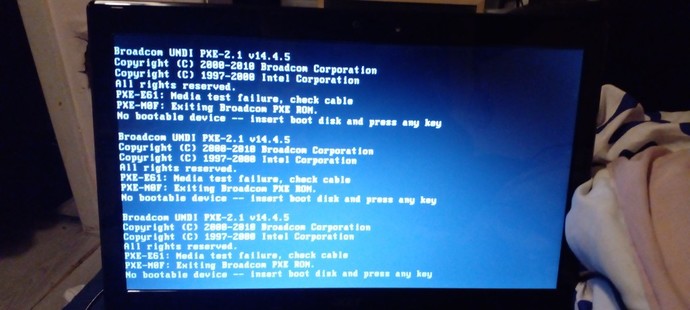
I don't have a boot disc what do I do to take this away any advice any buttons to press?
Updates
+1 y
No AV had this a while
Updates
+1 y
I got it fixed it what you said about the harddrive I checked the bottom took the back but off at the bottom a part moved out of place and I put it back in place tried putting it on again so thank you. Astarlrssnightsky when you mentioned hard drive I had a thought a maybe it was something in the part at bottom you unscrew and remove and a part fell out of place thanks U gave me idea so you helped 😉👍🏻👍🏻👍🏻
724 opinions shared on Technology & Internet topic.
Is this the first time you start your pc?
If yes, you need some form of boot device, cd, usb, external harddrive...
You can create one using another pc, at least for windows, and linux, mac os not sure.
Or you have the provided install cd at hand and insert this one.
if there this happened recently and the pc was running fine yesterday, last week... You can try setting the bios but usually any somewhat new pc will look automatically for boot data on the harddrive, double check to make sure, worst case your hardrive got damaged and you need to reinstall the OS.
I had a previous laptop "crash" when some firmware said "your disk is gonna stop working in 10 minutes" because it just got old. But just like @Astarlessnightsky said, I've been told that you can get your data restored. But please consider if this is necessary, because it can be damn expensive to have this done.
Check you haven't got any other storage device like usb stick HDD or card reader (even via a printer) connected to the pc
As someone has said check the internal HDD is properly connected.
If none of that helps you may just need to reinstall windows check for media (cd or usb) or manufacturer instructions how to do this. If you can't reinstall windows it's probably a HDD failure
 Girl's Behavior
  Guy's Behavior
  Flirting
  Dating
  Relationships
  Fashion & Beauty
  Health & Fitness
  Marriage & Weddings
  Shopping & Gifts
  Technology & Internet
  Break Up & Divorce
  Education & Career
  Entertainment & Arts
  Family & Friends
  Food & Beverage
  Hobbies & Leisure
  Other
Other  Religion & Spirituality
  Society & Politics
  Sports
  Travel
  Trending & News












What Girls & Guys Said
Opinion
3Opinion
Is this the first time you start your pc?
If yes, you need some form of boot device, cd, usb, external harddrive...
You can create one using another pc, at least for windows, and linux, mac os not sure.
Or you have the provided install cd at hand and insert this one.
if there this happened recently and the pc was running fine yesterday, last week...
You can try setting the bios but usually any somewhat new pc will look automatically for boot data on the harddrive, double check to make sure, worst case your hardrive got damaged and you need to reinstall the OS.
And PC includes laptops as well.
AV had this a while
It was working two days ago
In this case something got damaged, probably the hardrive, and the data got destroyed with it.
As its highly unlikely the settings in the bios boot menu change themselves.
In any case you need a boot device to start the pc and install windows or another OS again.
hopefully your private data are still there
I had a previous laptop "crash" when some firmware said "your disk is gonna stop working in 10 minutes" because it just got old. But just like @Astarlessnightsky said, I've been told that you can get your data restored. But please consider if this is necessary, because it can be damn expensive to have this done.
Check you haven't got any other storage device like usb stick HDD or card reader (even via a printer) connected to the pc
As someone has said check the internal HDD is properly connected.
If none of that helps you may just need to reinstall windows check for media (cd or usb) or manufacturer instructions how to do this. If you can't reinstall windows it's probably a HDD failure
U need a boot disk check the connections on ur hard drive or restart computer and press f12 key or f11 or f10 or f1 or f2