 Girl's Behavior
  Guy's Behavior
  Flirting
  Dating
  Relationships
  Fashion & Beauty
  Health & Fitness
  Marriage & Weddings
  Shopping & Gifts
  Technology & Internet
  Break Up & Divorce
  Education & Career
  Entertainment & Arts
  Family & Friends
  Food & Beverage
  Hobbies & Leisure
  Other
Other  Religion & Spirituality
  Society & Politics
  Sports
  Travel
  Trending & News


I upgraded my Windows 7 PC to Windows 10 a few days ago, and here's my impression.
As far as UI performance, all things being equal, it's not much slower than Windows 7. I completely skipped Windows 8.x, and I will never use it on any of my machines. The metro UI is ridiculous. This is where the problems start with Windows 10: metro is still sort of here.
The Windows 8.x "menu" was just a bunch of flat blocks that had nothing to do with previous versions of Windows. That was the metro UI, and it was intended for touch screens. In Window 10, the old Windows menu is supposedly here, but the only similarity is clicking on an icon to bring it up.
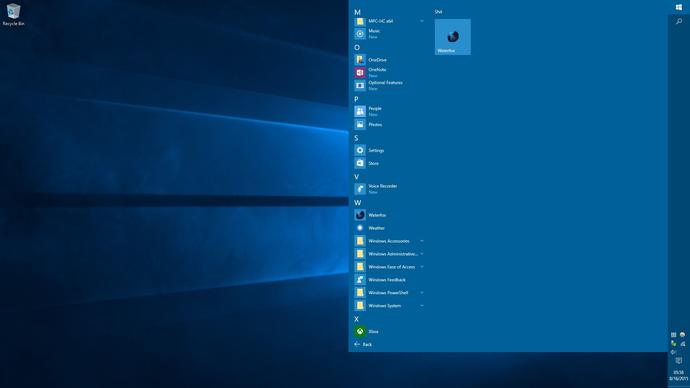
When you open the menu, you see an area to the right with several blocks representing applications, by default. These seem to be grouped, but it's not clear to me how to personalize them. There should be a way, but it's not intuitive. In this pic, I have removed everything I will never use. To the left there is an attempt to resemble the old Windows menu, but it just ends up looking like a bunch of haphazard list of applications and features wasting a bunch of space. Near the bottom of the menu, there is a link to change the menu into all the applications, which is what the picture above shows. Before I ran updates and tweaked things to my linking, typing while the menu was up would do a search of applications (and perhaps other stuff). For some reason, that, along with the search feature stopped working.
Once you do open an application, many of them seem familiar, such as Control Panel, which I opened in the pic below.
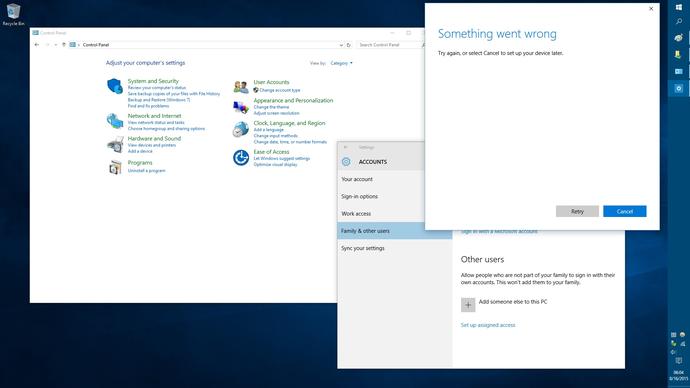
Many, if not most or all of the settings in the Control Panel seem to be accessed through other sorts of links, but this is how you get to the traditional Control Panel (or what's left of it) using mouse clicks. There are 3 issues in the pic above.
1. As I already mentioned, you have to go rifling through the awkward menu to find the Control Panel.
2. Once you open something in there, there is no guarantee that awkward, big-lettered (metro?) elements won't show up. Look at how it looks when you try to add a user. Cheap-looking UI elements jumbled together.
3. Unrelated to the UI, but it wouldn't let me add a user without a Microsoft email account. "Something went wrong"? Well, that's nice.
People with UHD and 4K displays report that fonts are blurry as they become zoomed in those displays, and that's no surprise, considering how shoddily the font display seems to have been put together. It feels like some of the crap nobody wanted in Windows 8.x (except maybe a small minority of Windows tablet users) got slapped onto Windows 7.
Then there is Windows Defender. This anti-malware feature is installed and enabled by default, and it's not very good. It's slow and bloated and I would prefer to use something like avast, or nothing at all. As of today, I had to re-enable it because disabling it broke Windows Updates. Also, I couldn't find a way to uninstall it. If there is a way to remove it, it's probably a hack, of some sort.
There are other issues, like the fact that by default, Windows 10 "phones home" like crazy. I disabled all these options, but who knows if more are hidden away somewhere.
There is the new Microsoft Edge browser, being promoted as the next best thing after Internet Explorer. When I checked the user agent string, this came up:
Mozilla/5.0 (Windows NT 10.0; Win64; x64) AppleWebKit/537.36 (KHTML, like Gecko) Chrome/42.0.2311.135 Safari/537.36 Edge/12.10240
This browser is using the Chrome engine? What the hell? If that's the case, why shouldn't I just use Chrome?
My final verdict is that Windows 10 sucks horribly. Some are saying they will wait for a service pack to fix everything, but MS would have to fundamentally change some major things to make it better. At that point, they might as well call it Windows 11. It's not as bad as Windows 8.x, but that's not saying much. When I get the chance, I'm going to wipe this machine and re-install Windows 7.




















Most Helpful Opinions